Key Technologies
Temporal
Learn how Temporal uses durable execution to keep multi-step processes running through failures, retries, and long waits.
Imagine you're building the backend for an ecommerce company. When a customer places an order, you need to:
- Charge their card
- Reserve the inventory
- Request shipment
- Wait for the package to be delivered
- Send a review email
Ignoring failures for a moment, you might imagine writing something like:
function processOrder(order):
    chargeCustomer(order)
    reserveInventory(order)
    requestShipment(order)

    while not isDelivered(order):
        sleep(5 days)

    sendReviewEmail(order)
Of course, you probably wouldn't actually leave a server process running and polling for five days. You'd break the process apart, persist the current state somewhere, and arrange for the next step to run when the carrier tells you the package was delivered.
And then what about a failure that happens halfway through? Say Stripe successfully charges the customer and your server crashes immediately afterward. When another server takes over, how does it know whether the charge happened? If it runs the step again, you could charge the customer twice.
You could build the infrastructure to solve these challenges yourself, sure, but it would require a lot of work that is difficult to get right.
This is the sort of problem Temporal is built to handle.
Temporal is one way to solve this. Services can also coordinate through events, or use another workflow system like AWS Step Functions. Our Multi-step Processes article walks through those approaches and their tradeoffs. Here, we'll focus on how Temporal works.
Building durable execution from scratch
Temporal can feel a little strange when you first encounter concepts like Workflows, Activities, replay, and deterministic execution. The easiest way to understand why those concepts exist is to imagine building a simple durable execution system ourselves.
Make the function survive a crash
Let’s start with the most basic requirement. We want processOrder to survive a server crash.
The first problem is that several steps in our function interact with systems outside of our process. chargeCustomer might call Stripe, reserveInventory might update a database, and requestShipment might make a request to a shipping provider.
If one of those calls succeeds and our server crashes immediately afterward, we need some durable record that it happened so we don't take the same action again.
So instead of calling these functions directly, imagine that every external operation goes through our execution framework. When an operation finishes, the framework records both the fact that it completed and the result it returned.
For example, after charging the customer and reserving inventory, we might have a history like this:
ChargeCustomerCompleted {
    result: paymentId_123
}

ReserveInventoryCompleted {
    result: reservationId_456
}
Now suppose the server crashes before we request shipment.
The process that was running processOrder is gone, but the results of the work it completed are still sitting in durable storage.
When another server takes over, it can run processOrder again from the beginning.
This time, whenever the function asks our framework to perform an external operation, the framework first checks whether it already has a recorded result for that operation.
chargeCustomer(order)
→ ChargeCustomerCompleted already exists
→ return paymentId_123

reserveInventory(order)
→ ReserveInventoryCompleted already exists
→ return reservationId_456

requestShipment(order)
→ no completed result exists
→ execute it
→ record the result
Stripe doesn't get called again because the completed charge is already in the history. Neither does our inventory service. From the perspective of processOrder, those functions simply return the same values they returned the first time.
This assumes the framework recorded the operation's completion. If Stripe succeeds but the server crashes before reporting success, the framework may retry the operation. That's why external side effects still need to be idempotent. Our Multi-step Processes pattern covers how to handle these retries safely.
By running the function again and substituting previously recorded results whenever work has already completed, we can reconstruct the state of the program without restoring the original process.
This is called replay.
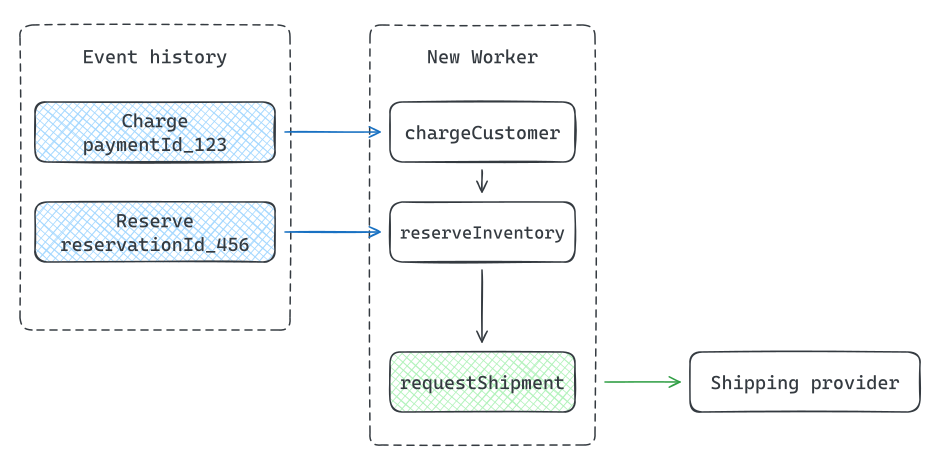
Replay returns saved payment and inventory results to a new Worker before requesting shipment.
As long as the history of completed operations is durable, the worker running the function can disappear and another worker can reconstruct the execution later.
This naturally gives our framework two kinds of code. The orchestration logic can be replayed, while operations that interact with the outside world need to execute separately and have their results recorded.
Temporal calls the replayable orchestration code a Workflow, and it calls the external operations Activities.
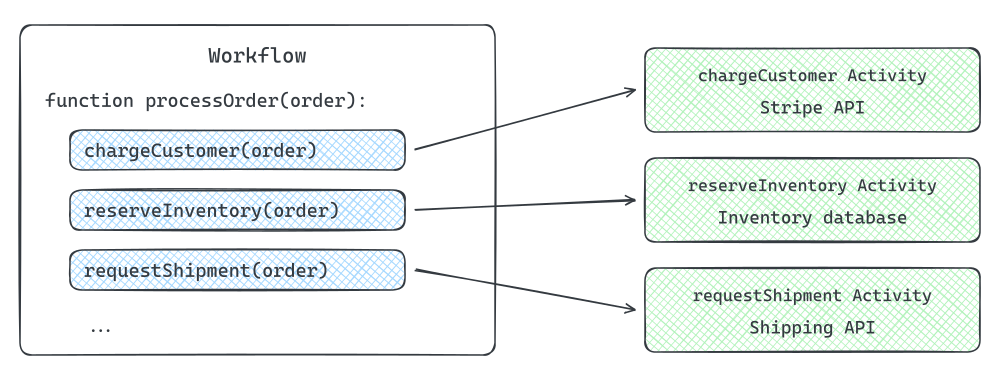
The processOrder Workflow calls separate Activities: chargeCustomer calls Stripe, reserveInventory updates the inventory database, and requestShipment calls the shipping API.
Make replay predictable
Now that our framework can replay a Workflow, there is another problem we need to solve. Running the same function again only works if it makes the same decisions it made the first time.
Imagine our ecommerce company offers same-day fulfillment for orders placed before 5 PM. We might add some logic like this:
function processOrder(order):
    chargeCustomer(order)
    reserveInventory(order)

    if currentTime() < 5:00 PM:
        requestSameDayPickup(order)
    else:
        requestNextDayPickup(order)

    waitUntilDelivered(order)
    sendReviewEmail(order)
Suppose the customer places their order at 4:59 PM.
The Workflow charges them, reserves the inventory, sees that it is still before 5 PM, and requests a same-day pickup. Our history now contains something like:
ChargeCustomerCompleted
ReserveInventoryCompleted
RequestSameDayPickupCompleted
Then the server crashes.
A few minutes later, another worker replays processOrder from the beginning. The charge and inventory reservation return their previously recorded results.
But then we reach this line again:
if currentTime() < 5:00 PM:It is now 5:03 PM.
The first execution took the requestSameDayPickup branch. The replay takes the requestNextDayPickup branch.
That is a serious problem! Our history says the next thing that happened was RequestSameDayPickupCompleted, but the code we are replaying is now asking us to execute requestNextDayPickup.
Replay only works if the Workflow follows the same path every time it is reconstructed from the same history. In other words, our Workflow code needs to be deterministic.
One way to solve the time problem is to make time itself go through our framework. Instead of reading the machine's wall clock directly, the Workflow asks the framework for the current time.
On the first execution, the framework might return 4:59 PM and record enough information to reproduce that value later. During replay, it returns the same logical time rather than whatever time happens to be on the new worker's clock.
Now the Workflow takes the same branch and its execution still matches the history.
Temporal imposes this same constraint on Workflow code. You generally cannot reach out to the outside world or read nondeterministic values like the machine's current time directly from a Workflow. Instead, Temporal's SDK provides Workflow-safe versions of operations like reading the current time so that they behave consistently during replay.
Let the Workflow wait
So far our Workflow only does things that happen immediately. But our original order flow also had this:
waitUntilDelivered(order)That could take days.
Before worrying about how we learn that the package was actually delivered, let’s solve a simpler version of the problem. Suppose our shipping provider tells us that delivery will take five days, and we just want the Workflow to wait for five days before continuing.
We might want to write:
function processOrder(order):
    chargeCustomer(order)
    reserveInventory(order)
    requestShipment(order)

    sleep(5 days)

    sendReviewEmail(order)
We obviously don’t want sleep(5 days) to literally keep a worker process alive for five days. We might have millions of orders in flight at once, most of them doing absolutely nothing while they wait.
So we need to make waiting durable too.
When the Workflow reaches sleep(5 days), our framework can calculate when the timer should fire and persist that somewhere durable.
TimerStarted {
    fireAt: May 15, 10:00 AM
}
At that point, there is nothing else for the Workflow to do. We can stop running it entirely and free the worker to do something else.
Our framework needs a background scheduler that checks for timers whose deadlines have passed. It can keep the timers ordered by their deadlines in durable storage, so it doesn't have to inspect every waiting Workflow. Five days later, the scheduler finds our timer and records another event.
TimerFiredThe next time the Workflow runs, replay eventually reaches the timer again.
sleep(5 days)
→ TimerStarted already exists
→ TimerFired exists
→ continue
If the timer had not fired yet, the Workflow would simply stop there again.
This means a Workflow can appear to sleep for five days, five months, or even longer without having a process sitting around that entire time.
Temporal provides this abstraction as durable timers. Its History Service stores a Timer Task with a deadline. A background timer processor reads these tasks and processes them when they're due, recording TimerFired and scheduling the Workflow to run on an available Worker. We'll look at how these services fit together below.
The timer processor serves many Workflows; each sleeping Workflow doesn't need its own process. If the History Service instance crashes, another instance takes over and recovers the pending timers from storage. An outage can delay a timer firing, but it doesn't erase the timer.
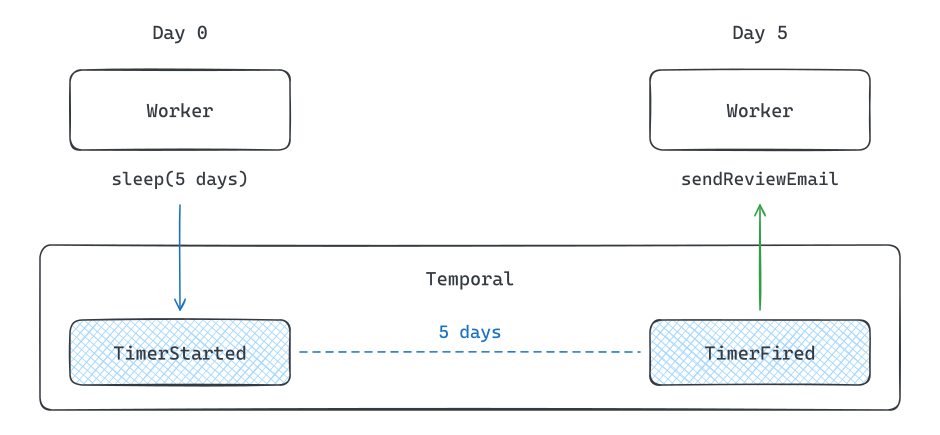
Temporal persists a timer between Day 0 and Day 5; a Worker runs only when the Workflow starts waiting and when it resumes.
Let the outside world wake the Workflow
A five-day timer works if we know exactly how long we want to wait. But delivery does not really work that way.
The package might arrive tomorrow, or it might take a week. What we actually want is for the Workflow to wait until the shipping carrier tells us the package has been delivered.
So let’s go back to:
waitUntilDelivered(order)When the Workflow reaches this point, there is nothing else it can do yet, so it can stop executing.
Then, three days later, the carrier sends a webhook telling us the package was delivered.
Our framework needs some way to get that information into the already-running Workflow. The simplest thing to do is append it to the Workflow's durable history.
ChargeCustomerCompleted
ReserveInventoryCompleted
RequestShipmentCompleted
PackageDelivered
That new event causes the Workflow to run again. When replay reaches waitUntilDelivered, the delivery event is now in the history, so execution can continue.
waitUntilDelivered(order)
→ PackageDelivered exists
→ continue

sendReviewEmail(order)
→ execute
→ record result
A Workflow can therefore sit idle for days or weeks and resume when new information arrives, without needing a worker process to remain alive in the meantime.
Temporal calls this kind of external input a Signal. A Signal lets another system send information to a running Workflow. Temporal records that information in the Workflow's history and wakes the Workflow so it can react to it.
In our order example, the carrier webhook can Signal the Workflow that the package was delivered, allowing waitUntilDelivered(order) to complete and the review email to be sent.
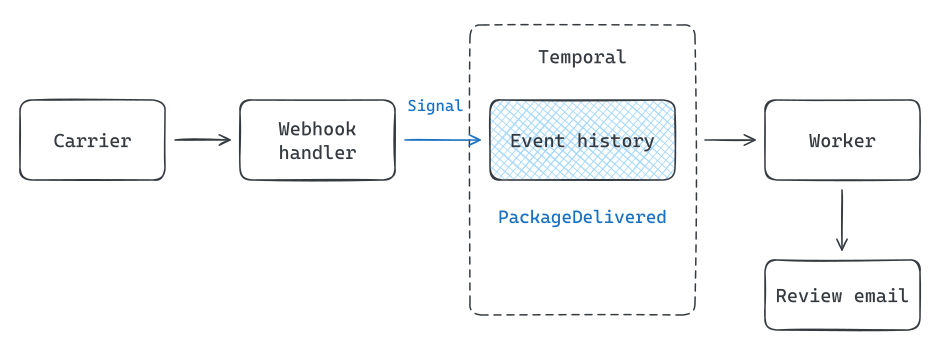
The carrier webhook sends a Signal to Temporal, which records delivery and schedules the Workflow to continue on a Worker.
What is Temporal?
We started with an ordinary function and, one problem at a time, ended up building most of Temporal's programming model.
Temporal is a workflow orchestration system built around durable execution. A Workflow contains replayable orchestration logic, while Activities perform work that interacts with the outside world. Temporal records the results of that work in a durable execution history, which lets it replay a Workflow and reconstruct its state after a failure.
Because Workflows are replayed, their code must be deterministic. Timers let them wait without keeping a worker alive, and Signals let outside systems deliver new information to a Workflow that is already running.
That programming model lets our order process look remarkably close to the simple sequential code we wanted to write in the first place:
workflow processOrder(order):
    chargeCustomer(order)
    reserveInventory(order)
    requestShipment(order)

    waitUntilDelivered(order)

    sendReviewEmail(order)
The interesting question now is how Temporal actually implements all of this.
Temporal under the hood
Now that we understand what Temporal is at a high level, let's look under the hood.
In a system design interview, you'll almost certainly never need to know Temporal's internals. Feel free to skip this section unless you're curious.
The architecture underneath that model is roughly:
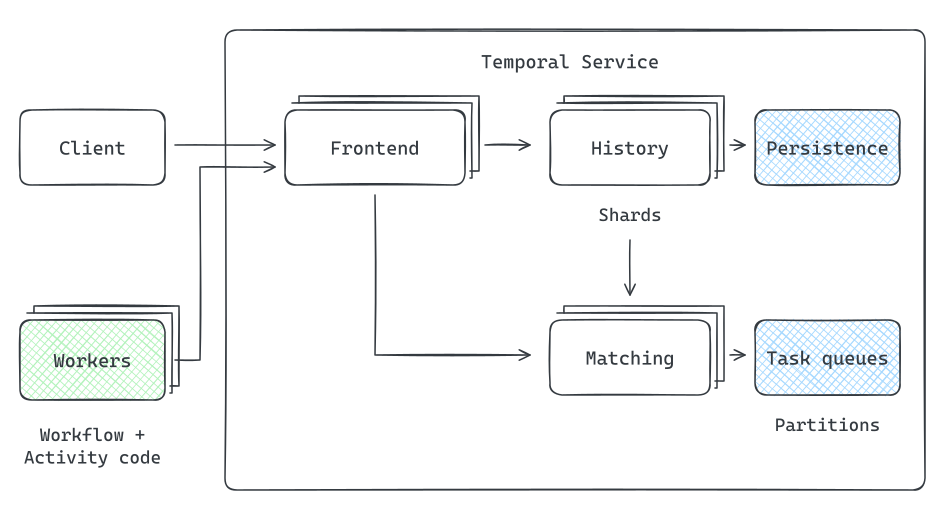
Clients and Workers connect through Frontend. Frontend, History, Matching, and Workers each scale as separate fleets; History owns shards and Matching manages Task Queue partitions.
- The Frontend Service is the stateless entry point into the Temporal cluster. Clients and Workers connect to it, and it routes their requests to the appropriate internal service.
- The History Service owns the durable state of Workflow Executions. It processes things like Activity completions, Signals, timers, and decisions made by Workflow code.
- The Matching Service manages the Task Queues that connect Temporal to your Workers.
- Workers are application processes running your code. Temporal itself does not execute your Workflow or Activity code inside the Temporal Service. Workers poll Temporal for work, execute the appropriate code, and send the result back.
How Workflow state is stored
A Temporal cluster may be responsible for millions of Workflow Executions, so the History Service cannot have a single machine responsible for all of them.
Instead, Workflow Executions are divided across a fixed number of History Shards. Each History Service instance owns some subset of those shards and is responsible for processing requests and timers for the Workflows inside them. If History Service instances are added, removed, or fail, ownership of those shards can move between instances.
When something happens to one of our order Workflows, the History Service performs a state transition.
For example, suppose chargeCustomer finishes successfully.
Conceptually, the History Service does something like:
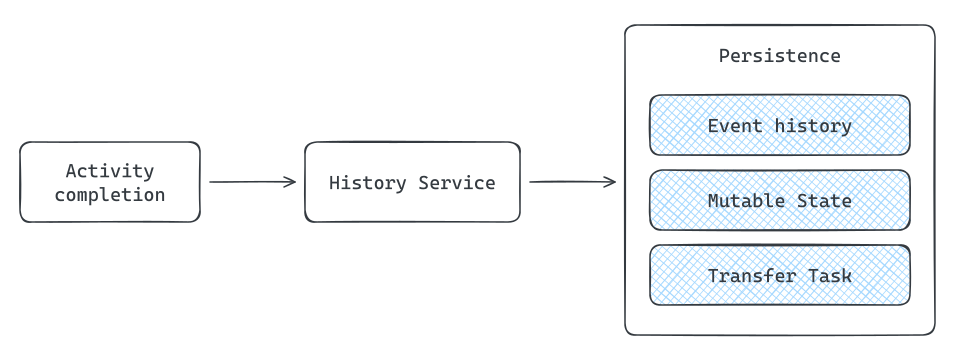
The History Service processes an Activity completion and persists the Event History update, Mutable State, and a Transfer Task together.
Temporal maintains the Event History we already learned about, but it also persists something called Mutable State. Mutable State is essentially a materialized view of the Workflow's current server-side state, including things like pending Activities, outstanding timers, and child Workflows.
Most of that information could theoretically be reconstructed by scanning the Event History every time something happened, but that would be unnecessarily expensive. Mutable State lets the History Service efficiently answer "what is happening with this Workflow right now?" while the Event History remains the durable record from which that state can be recovered.
The History Service also needs to make sure that updating Workflow state and scheduling whatever should happen next do not get separated by a crash.
Suppose an Activity completes and the Workflow now needs to run again. Temporal persists the updated state along with a durable internal Transfer Task. A background processor eventually sends that task to the Matching Service, which makes the corresponding Workflow Task available to a Worker.
This is effectively a transactional outbox. Temporal can crash after committing the Workflow state and still know that the resulting work eventually needs to be dispatched.
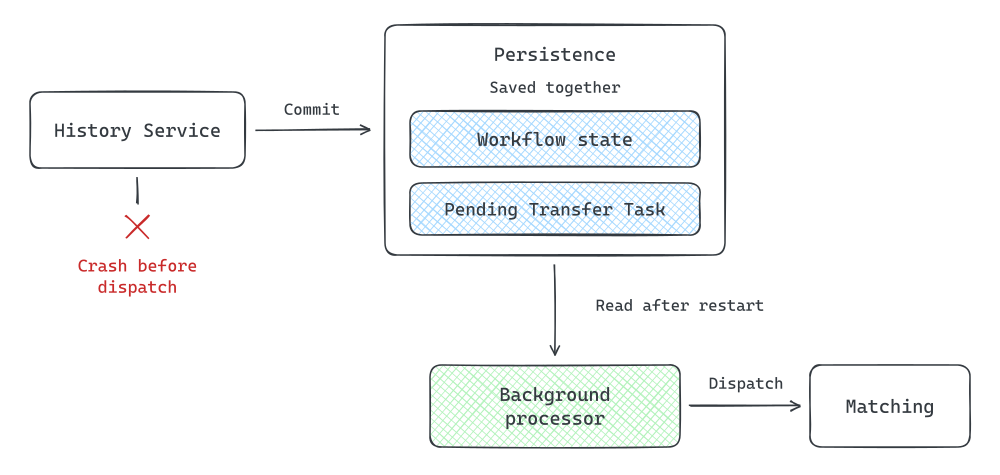
Workflow state and a Transfer Task are committed together. A background processor reads the persisted task and dispatches it to Matching, even if History crashed after the commit.
Timers use the same general mechanism. A timer is stored as an internal Timer Task associated with the History shard. When its trigger time arrives, Temporal records the timer firing and creates the work needed to run the Workflow again.
For a self-hosted deployment, this durable storage can be PostgreSQL, MySQL, or Cassandra. Temporal manages the database schema for Event History, Mutable State, and internal tasks.
How Temporal avoids replaying everything constantly
Replay gives Temporal a powerful recovery mechanism, but replaying a long Workflow from its entire Event History every time anything happened would be expensive.
So Workers cache Workflow state in memory.
When a Workflow Worker first receives a Workflow Task, it uses the Event History to reconstruct the Workflow and then keeps that reconstructed state in a Workflow Cache.
Temporal then tries to send subsequent Workflow Tasks for that Workflow back to the same Worker. This optimization is called Sticky Execution.
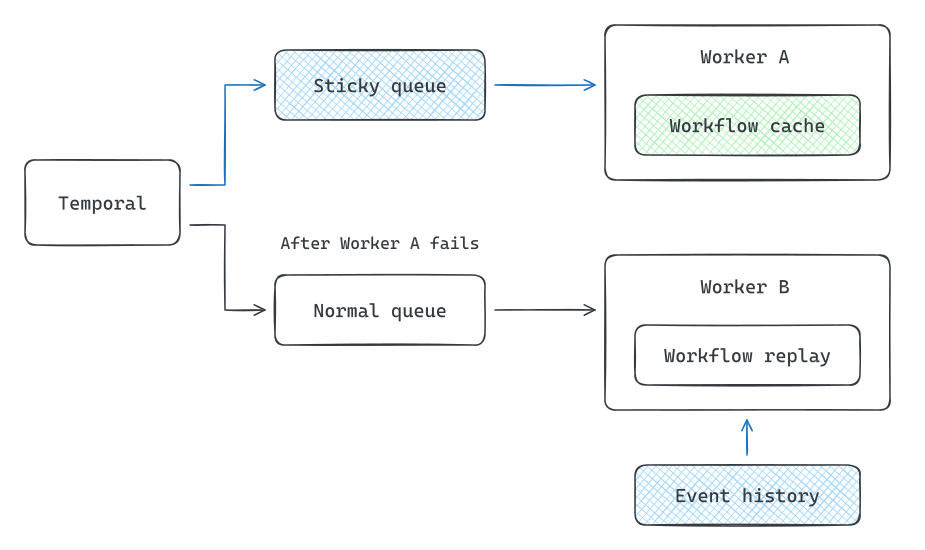
A sticky queue routes Workflow Tasks to Worker A's cache. After Worker A fails, the normal queue sends work to Worker B, which replays the Event History.
Under the hood, the Worker polls both the normal Task Queue and a Worker-specific Sticky Queue. Once a Worker has cached a Workflow, future Workflow Tasks can be routed through that sticky queue rather than forcing another Worker to reconstruct the Workflow from scratch.
But the cache is just an optimization: if the Worker crashes or the Workflow gets evicted from the cache, another Worker can reconstruct the Workflow from its durable history. Temporal sends the next Workflow Task through the normal Task Queue so an available Worker can pick it up.
So the Event History provides correctness, while sticky execution and caching provide performance.
Workers and Task Queues
So how does Temporal find a Worker to run the next piece of code? Your application gives the work a Task Queue name, such as payments, and you configure the Workers that can handle that work to poll the same name.
The Task Queue is the named destination for the work. The Matching Service is the part of Temporal that manages these queues and hands tasks to Workers polling them. When History needs code to run, its background processors send a task to Matching for the appropriate queue. Matching delivers it to one of the Workers waiting for work on that queue.
There are two important types of tasks:
- A Workflow Task tells a Worker to run the Workflow code and determine what should happen next.
- An Activity Task tells a Worker to perform an operation, such as calling Stripe or sending an email.
These do not necessarily need to run on the same machines.
For example, we might have:
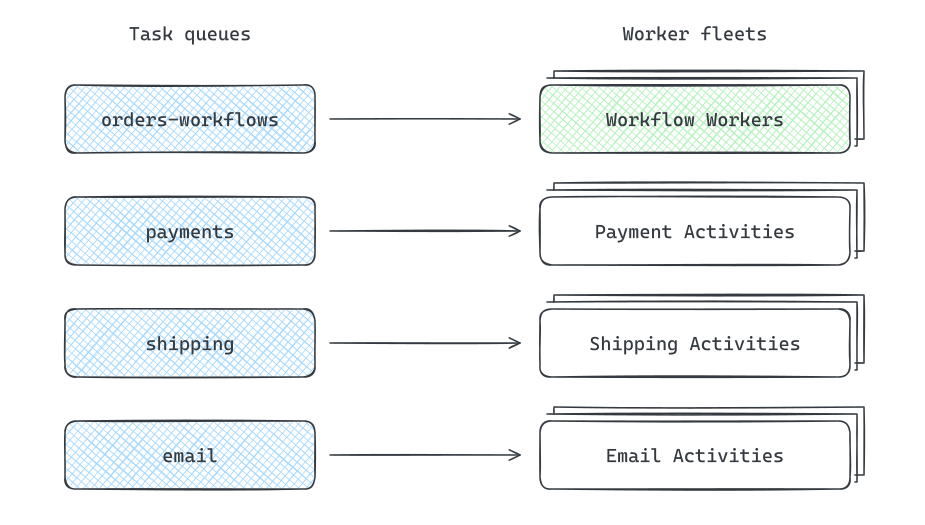
Separate Task Queues route order Workflows, payment Activities, shipping Activities, and email Activities to their respective Worker fleets.
This lets different kinds of Activities run on completely different Worker fleets. CPU-heavy work could have its own machines, GPU work could have another fleet, and sensitive payment Activities could run in an isolated service. A Worker process can also run both Workflow and Activity code if separating them is unnecessary.
Matching does not need to know anything about the implementation of those Workers. It simply matches Tasks with Workers polling the appropriate Task Queue.
These are queues implemented by Temporal itself. When a Worker is already polling, Matching can hand it a task directly. Otherwise, it stores the task in the persistence database until a Worker is available.
Task Queues themselves can also be partitioned across Matching Service instances to increase throughput, so a heavily used queue does not need to be served by a single machine.
How the cluster scales
One reason teams choose Temporal is that the number of processes they're tracking can grow without requiring a Worker for each one. Our ecommerce company might have millions of orders waiting for delivery, with only a small fraction ready to do any work right now.
Those waiting orders still take up database space, but they don't each occupy a Worker. If a burst of delivery notifications arrives, we can add Workers to process the review emails. The amount of Worker compute we need depends on the work ready to run, not how many orders are still open.
The Temporal Service can scale separately to handle the coordination. More Frontend instances handle API traffic, more History instances share ownership of the History Shards, and more Matching instances handle Task Queue partitions. If Workflow state updates become the bottleneck, adding application Workers won't fix that; we'd need more capacity in History or its database.
This lets us add capacity where the load actually grows. A backlog of emails needs more email Workers. A growing rate of Workflow updates needs more capacity in the Temporal Service and persistence layer.
When to Use Temporal
Temporal is a good fit when you have a multi-step process that needs to survive failures or long periods of waiting.
A common sign you need Temporal is that you've started building a state machine yourself. You need to persist which step completed, schedule what happens next, retry failed work, and recover after a worker crashes.
Consider using Temporal when
- A process has several dependent steps that need to happen reliably. YouTube's post-processing pipeline splits a video into segments, transcodes them in parallel, and joins the results into finished outputs.
- The process can stay open while waiting for something. Uber ride matching waits for a driver response or a timeout before deciding whether to try the next candidate.
- You need to recover from partial execution. If a YouTube processing worker disappears halfway through the DAG, Temporal can reconstruct the Workflow and continue scheduling unfinished work.
- Retries and recovery are becoming a meaningful part of your application logic. At some point, you are effectively building your own workflow engine.
A queue is often enough for one asynchronous job. Temporal becomes useful when you need to coordinate the whole process across many steps and failures.
Examples from Our Problem Breakdowns
We propose Temporal in three of our system design problem breakdowns:
- Design Uber uses a Workflow to offer a ride to one driver, wait 10 seconds, and move to the next candidate after a decline or timeout.
- Design YouTube uses Temporal to orchestrate a DAG that splits uploaded videos, processes segments in parallel, and assembles the results.
- Design a Flash Sale presents a Temporal timer as one way to expire inventory reservations durably outside the Sale Service.
In each case, you could build the orchestration yourself with database state, queues, timers, and workers. Temporal lets you represent that orchestration directly as code instead.
In a system design interview, keep in mind that not every interviewer will let you use Temporal.
For some problems, durable workflow orchestration is the thing they're actually asking you to design. Dropping Temporal into the architecture can effectively solve the hardest part of the interview in one box.
The good news is that after understanding how Temporal works, you already have a strong blueprint for how to design that system yourself.
Knowing its limitations
Temporal isn't the right answer every time you need asynchronous work.
-
Simple background jobs Our Design a Notification System breakdown deliberately uses a queue rather than Temporal because exposing the delivery and retry machinery is the interesting part of that design. For a single independent job, a normal task queue like SQS may be much simpler.
-
Streaming workloads Temporal is not a replacement for Kafka or another event streaming platform. If the problem is primarily about continuously processing a high-volume stream of events, use a system designed for that.
-
External side effects still need idempotency Temporal can retry Activities, which means calls to systems like Stripe or your database may be attempted more than once. You still need to make those operations safe to retry.
-
Workflow code has constraints Because Temporal reconstructs Workflows through deterministic replay, you can't treat Workflow code exactly like ordinary application code. Operations whose results can change, such as database queries or external API calls, generally need to happen in Activities.
Summary
Temporal is useful when coordinating a process becomes a substantial engineering problem of its own. Several steps need to happen in order, failures need retries, and the process may wait days for an external event. Keeping track of all of that across server crashes is work Temporal can take on, while your application expresses the sequence in code.
That comes with responsibilities. Workflow code must behave consistently during replay, and external operations must be safe to retry. Temporal preserves the execution history and coordinates recovery, but your application still decides what to do when a payment fails, inventory runs out, or a customer cancels.
In an interview, start with the process you're designing and explain where it needs to recover from failures or wait for external input. If a queue and a worker are enough, keep it simple. If you'd otherwise need to build and maintain the state tracking, retries, and recovery for a multi-step process, you have a concrete reason to bring in Temporal.
Test Your Knowledge
Answer the question below to find your gaps.
Mark as read
Your account is free and you can post anonymously if you choose.