Overview
Introduction
Understand what AI-enabled coding interviews are, why companies are adopting them, and what skills they actually evaluate.
AI-enabled coding interviews are new, and they're spreading fast. Meta, Shopify, LinkedIn, Canva, Uber, and a growing list of other top companies now sit you down with an AI assistant and a real codebase instead of a blank editor and a single algorithm question. The format moves faster than the advice written about it, so most of what you'll find online is guesswork.
Over the past few months, we talked to dozens of candidates who had just gone through these interviews, along with the interviewers now responsible for running and grading them.
Candidates told us how the interview unfolded, where they got stuck, what surprised them, and what they wish they had done differently. Interviewers told us what they were grading, and how they could tell when someone was in control versus just prompting and hoping.
This guide is built from those conversations.
We’ll walk through the core skills one at a time. How to get your bearings in an unfamiliar codebase, how to form a plan before opening the AI chat, how to use the model without handing it the wheel, how to verify what it gives you, and how to keep the interviewer with you while you work.
From there, we’ll break down the common problem patterns these interviews are built around and how specific companies are running the format today.
Let's get started.
What makes this format different
AI-enabled coding problems are much larger than traditional coding interviews. Instead of implementing a single function, you might be dropped into a multi-file codebase and asked to fix a bug, add a feature, and make it scale, all in one session. Traditional interviews produce 30-50 lines of code. AI-enabled ones produce several hundred lines across multiple files. You're not writing all of it by hand, but you need to understand all of it.
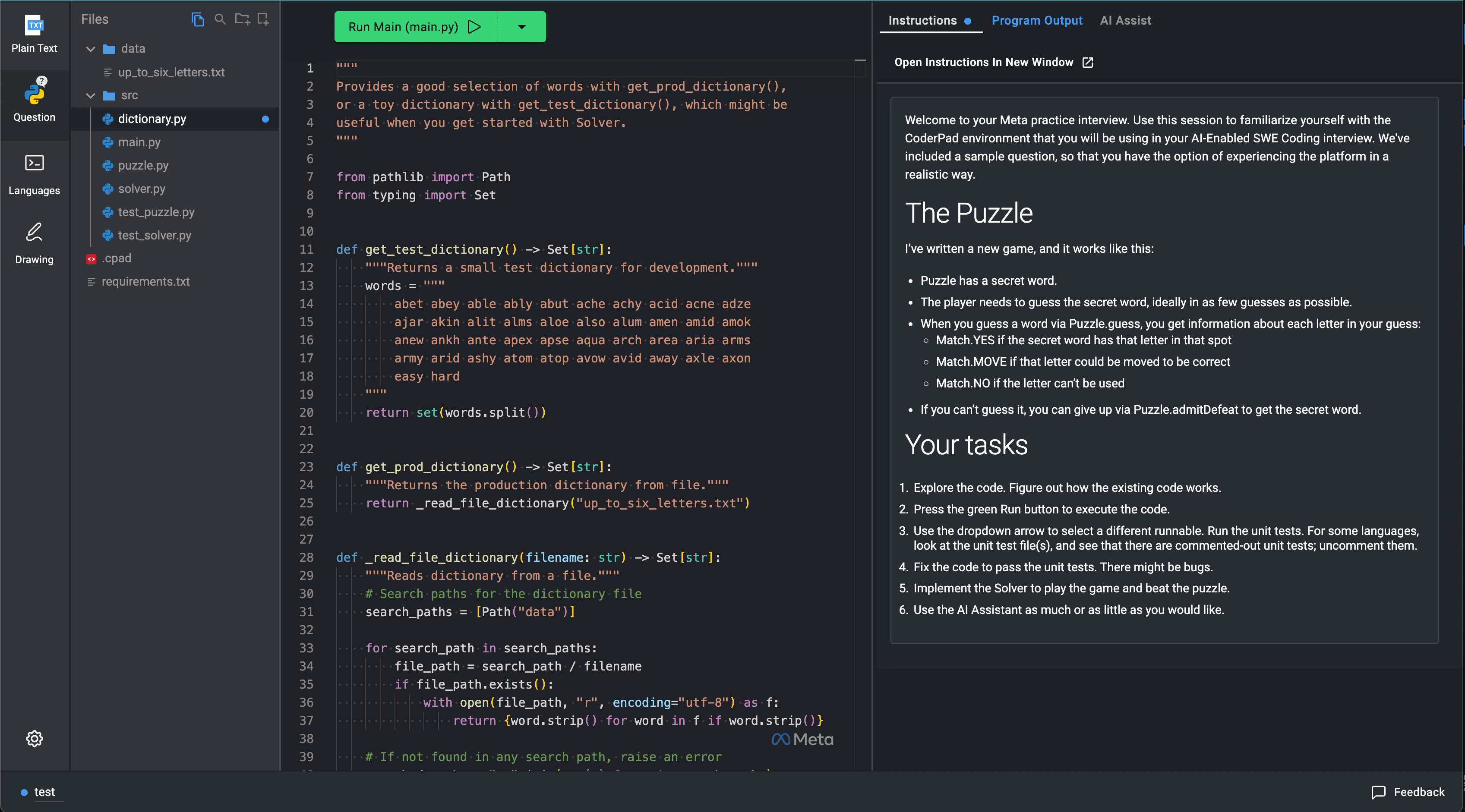
A screenshot of the CoderPad environment from Meta
The skills that matter shift, too. Algorithm memorization counts for less, and reading unfamiliar code quickly counts for a lot more. You're also running two conversations at once, one with the AI and one with the interviewer, and most candidates underestimate how unnatural that feels until they're in it.
These interviews come in two common forms, and which one you get changes how you prepare. A structured interview hands you everything, a browser environment like CoderPad, a fixed set of AI models, and a problem that walks from fixing a bug to adding a feature to handling scale. An open-ended one is all you. You work in your own editor with your own AI tools, share your screen, and either build from scratch or start from an existing codebase. The habits in this guide carry across both, but the tactics differ enough to matter, so the two main formats get their own article next.
What interviewers are evaluating
AI makes you feel productive even when you're in trouble. You paste the problem in, get 200 lines of code back, and feel like you're flying. But if you never planned, can't explain what came back, and are accepting everything without a second look, the code can look great while you bomb the interview.
Prompting matters, but not in the way most candidates think. Interviewers are not grading clever prompts. They’re watching whether you are still in control of the work.
The formats differ, but the four things they evaluate stay consistent across companies:
- Problem-solving and approach: can you break down the problem and tackle things in the right order?
- Control over the AI: are you directing the AI, or is it directing you?
- Verification habits: do you review and test what the AI gives you, or accept it?
- Communication: can you keep the interviewer in the loop while working with AI?
Problem-solving and approach
The fundamentals haven't changed. Interviewers still want to know if you can understand a problem, break it down, and prioritize correctly.
AI does add a failure mode that doesn't exist in traditional interviews. Because the model responds instantly and produces complete-looking code, it can hide the fact that you don't actually have a plan. Strong candidates spend the first few minutes understanding the problem and forming an approach before they ever open the AI chat.
Most common mistakes:
- Pasting the raw problem into AI without forming your own plan first, then building on whatever comes back
- Following the AI into architectural decisions that should be yours to make
- Chasing an AI-suggested rewrite when the model doesn't know the answer, which feels like momentum but is really just the model guessing
Think out loud during this phase. Tell the interviewer what you're doing. Something like "I'm going to take a couple minutes to read through this and make sure I understand the requirements before I start." It signals confidence and keeps them engaged, the same way you would in a traditional coding interview.
Control over the AI
Just about every interviewer we talked to had told us the same thing: "We don't want the AI making decisions. We want to see you making decisions and using the AI to execute them." The approach is yours to set, and the AI is there to carry out the plan you've laid down. The moment it starts making the architectural calls while you sit and watch, you've given away the exact thing the interview is there to assess.
A Rippling candidate got explicit feedback that they "relied too heavily on AI even though their initial approach was correct." They knew what to build, but they let the AI make the implementation decisions, and that's the distinction that cost them. Leaning on the AI to do the work is fine, but the trouble starts when you hand it the decisions too. At Canva, the interviewer pauses after each AI generation and asks "what does this code do?" If you can't walk through the generated logic confidently, it tells them you're not really directing the work.
Most common mistakes:
- Accepting AI architectural suggestions without evaluating them (it proposes a BaseProcessor superclass and you add it without asking whether it actually makes sense)
- Treating AI output as the finished solution rather than a draft to review and accept or reject
- Not redirecting when the AI drifts into a different approach than the one you planned
If you replaced the AI with a junior engineer pair programming with you, would you be comfortable with how you're directing them? That's what interviewers are looking for. You're the senior engineer. The AI is your very fast, occasionally wrong, pair partner.
Verification habits
AI will introduce bugs. It will make wrong assumptions about your data model, miss edge cases, and produce code that looks right but subtly isn't. Candidates who accept AI output without reviewing it leave a bad impression, even when the code happens to work. The review catches mistakes, and it also shows the interviewer you're in control.
Most common mistakes:
- Not running code after each generation, then discovering cascading failures at the end with no time left to fix them
- Skipping the line-by-line read because the generated code looked right at a glance
- Skipping tests because of time pressure, which almost always costs more time than it saves
Good verification means running the code after each meaningful change, reading through what the AI generated to confirm it matches what you asked for, and testing before you move on to the next phase.
Communication
You're managing two conversations at once, and the hard part is that the AI generates code faster than you can narrate it, which creates a constant pull to just keep prompting in silence. That's the instinct you have to fight.
Most common mistakes:
- Going quiet for long stretches while prompting, leaving the interviewer with nothing to evaluate
- Narrating after the fact instead of before ("I just asked the AI to..." vs. "I'm going to ask the AI to...")
- Pivoting without explaining ("the AI suggested DFS so I'm using DFS now") without saying whether you actually agree
The fix isn't complicated. Say what you're about to do before you prompt, read the output out loud as it comes back, and call out anything that looks off.
How to use this guide
The Fundamentals section maps directly to the four evaluation areas above. Codebase orientation and planning your approach cover approach, driving the AI covers control, verification and testing covers exactly what it sounds like, and communication covers the narration piece. Read in order, or use the criteria above to find your weak spot and jump straight there.
Read the rest of the Overview section next. It covers the two main interview formats, how to prepare, and the patterns companies actually test for (and why).
Once you've covered the fundamentals, check out the company-specific breakdowns. We have detailed posts for Meta, Shopify, and LinkedIn, with more being added as the format spreads. Each one covers the platform, the format specifics, and what that company's interviewers care about.
This is a fast-moving space. We update our content as we collect new data, but details shift between interview cycles. Always verify the current format with your recruiter.
None of the engineers who passed were doing anything superhuman. They stayed in the driver's seat while the AI did the typing, and that's a skill you can build. The rest of this guide teaches it.
Practice before the real thing
We can't preach the importance of hands-on practice enough. It's too easy to fall into a nearly mindless lull while reading content. Practice is the best possible way to ensure all the lessons learned in this guide stick and can be applied in the real interview.
So we highly recommend doing at least one full run before your interview. Our AI coding practice drops you into a real session with your own editor and AI tools, then gives you feedback on the same four areas interviewers grade, where you stayed in control and where you let the model take over. One session is usually enough to make the two-conversation rhythm feel familiar instead of foreign on the day.
Questions as you go? Drop them in the comments, we read every one. You can also highlight any passage and hit "Ask Tutor" for a quick answer grounded in this guide.
Mark as read
Your account is free and you can post anonymously if you choose.