
Meta's AI-Enabled Coding Interview: How to Prepare
By Evan King
•
Try AI-Coding Yourself
Practice real problems in an AI-enabled environment
Try AI-Coding Yourself
Practice real problems in an AI-enabled environment
In October 2025, Meta started rolling out a new interview type called AI-enabled coding. An internal Meta message described it as "a new type of coding interview in which candidates have access to an AI assistant. This is more representative of the developer environment that our future employees will work in, and also makes LLM-based cheating less effective."
Since then, I've talked to candidates ranging from E5 to E7 and M2 who have gone through this interview. The experiences are all over the map, from a candidate who finished all three phases in 40 minutes to an E7 who watched Claude Sonnet repeatedly hallucinate on a maze problem. What follows is everything I've learned from those conversations, plus what candidates have shared through our community comments and DMs. I'll keep this updated as the format evolves.
If you're looking for a broader overview of AI-enabled coding interviews across all companies, check out our complete AI-coding interview guide.
Who gets this interview?
This is being used for Software Engineer and Engineering Manager roles as part of the onsite loop, all the way up to E7 and M2. You historically would have had two coding rounds, one design round (for mid-level and above), and one behavioral. Now, one of those coding rounds is the AI-enabled format.
You'll still have a traditional coding interview alongside it. One classic LeetCode-style algorithm problem (no AI) and one AI-enabled interview. Your recruiter will tell you which is which ahead of time.
The environment
You'll work inside a three-panel CoderPad layout. File explorer on the left, code editor in the middle, and the AI assistant plus problem instructions on the right. The AI chat window has context of the files in the project, but it can only respond in the chat panel. It can't directly edit your files. You still need to write or paste all code yourself. The project is multi-file, with existing classes, data models, and logic already written. You didn't write any of this code, and understanding it quickly is a massive part of the challenge.
Meta offers a choice of AI models you can switch between during the interview.
- GPT-4o mini
- GPT-5
- Claude Haiku 3.5 / 4.5
- Claude Sonnet 4 / 4.5
- Claude Opus 4
- Gemini 2.5 Pro
- Llama 4 Maverick
Pick the most capable model available. Some candidates have reported GPT-5 being too slow for interview conditions, so the Claude models tend to be a solid default.
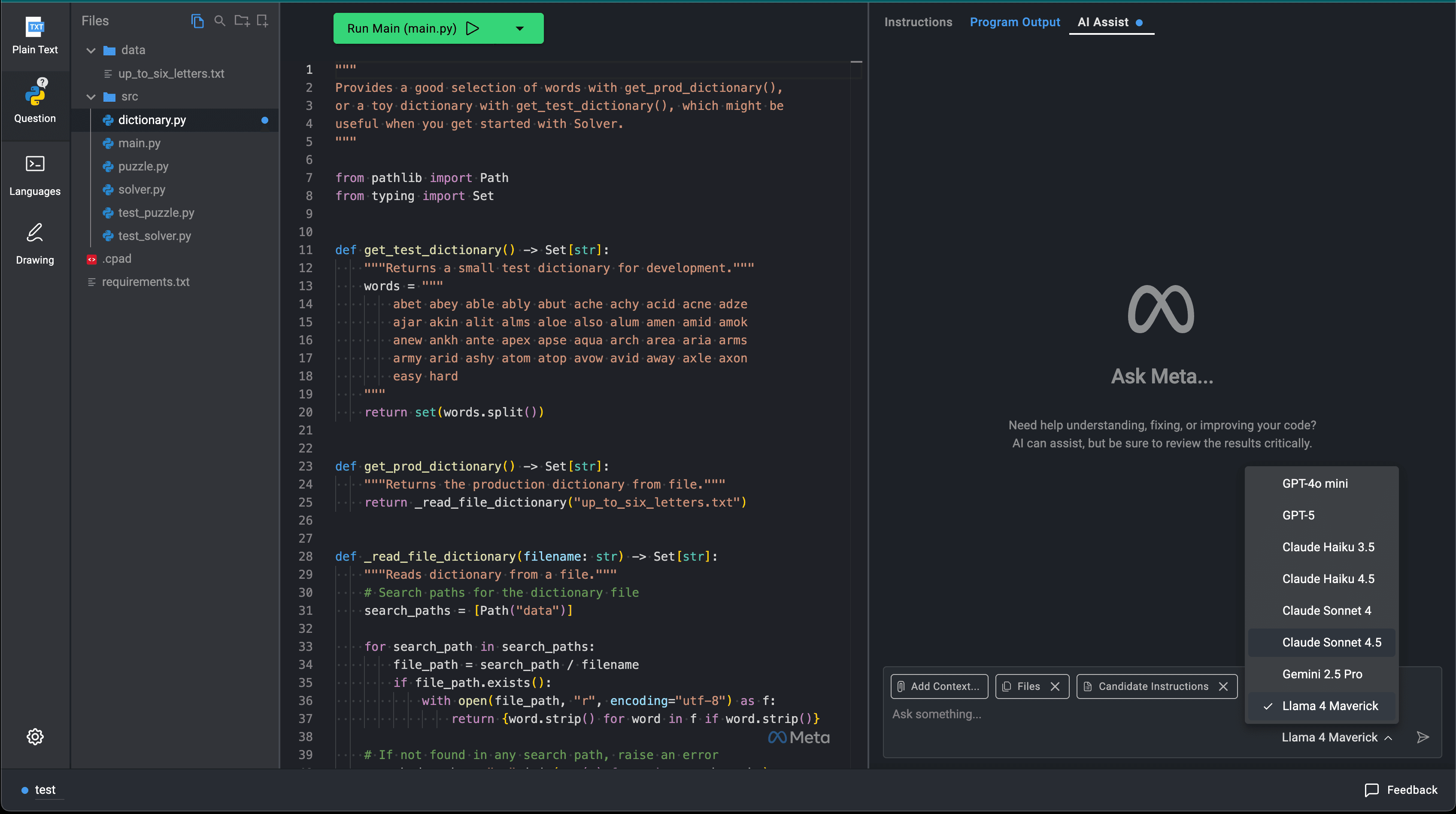
Meta CoderPad AI Models
The supported languages are Java, C++, C#, Python, Kotlin, and TypeScript. Confirm with your recruiter if you have a preference.
A few environment details that candidates have flagged. Code reruns automatically when you save (Cmd+S), and the dropdown for running tests vs. main stays on whatever you last selected, so you don't need to reselect it each time. The Program Output panel doesn't clear automatically between runs, and if you scroll up, it won't auto-scroll back down on new output. Small things, but knowing them saves you from fumbling with the UI while the clock is ticking.
Meta provides a practice environment before your interview with a sample problem called "the puzzle." Use it. Seriously. Multiple candidates have told me that getting comfortable with the CoderPad layout, the AI chat interface, and the test runner was one of the most valuable things they did. One E7 candidate said the biggest thing that helped was that he "wasn't surprised in the interview" because he'd spent time in the practice environment beforehand.
The AI might be nerfed
Multiple candidates have reported the AI being significantly less helpful during the actual interview compared to what they experienced in the practice environment.
An E7 candidate told me that Claude Sonnet "worked brilliantly in practice but gave wrong answers repeatedly during the interview." He prompted it multiple times for a straightforward maze traversal problem, the kind of thing Sonnet handles easily, and it kept producing incorrect if-statements in the wrong order. He eventually gave up on the AI entirely and tried to write the code himself.
Another candidate described asking the AI to "describe the codebase." In his own environment, this immediately revealed all the bugs. In the interview environment, it described the code's functionality without mentioning any issues.
A third candidate prompted the AI multiple times for help when stuck on a debugging problem and said it "was not helpful," despite the fact that the underlying problem was well within the model's capabilities.
Not everyone experiences this. Some candidates report no noticeable difference. A candidate in the October pilot used Llama 4 Maverick and the AI immediately pointed out a bug without being asked. But the pattern of reduced helpfulness is consistent enough that you should plan for it.
The leading theory, corroborated by multiple candidates, is that Meta modifies the AI's behavior through the system prompt. The AI is likely instructed not to point out bugs directly, not to provide complete solutions unprompted, and to describe functionality rather than identify issues. It's still useful for implementing known patterns, explaining syntax, and generating boilerplate, but it won't hand you the answer.
Don't build your entire strategy around the AI bailing you out. Practice solving hard problems yourself, then use AI to accelerate the parts you already understand. As one candidate put it, "If you don't know how to solve that problem by yourself, it's pretty difficult to use AI to solve that problem." We cover how to handle imperfect AI tools in our fundamentals section.
The three phases
Every Meta AI-enabled coding interview follows the same structure. Three progressive phases, all built around a single extended problem. Your interviewer will spend the first five to six minutes orienting you to the platform, showing you the files, and explaining how to run tests. From there, the phases begin.
Phase 1. Bug fixing
The codebase arrives with a bug. Your job is to find it and fix it.
This phase is where the AI rules get inconsistent. Some interviewers explicitly say "no AI for this part." Others leave it entirely up to you. I've heard from a candidate who was told to go straight to the tests without any reading time ("let's run it and see what happens"), and another who was shown the full lay of the land and told to read the code first. You can't predict which approach your interviewer will take, so be prepared for either.
If your interviewer leaves it open, I'd still recommend debugging phase 1 without the AI. Several candidates who did it on their own told me it gave the interviewer confidence right away. An E5 candidate said it showed the interviewer that "this candidate can solve problems independently." That's a strong early signal.
The bugs themselves are typically not algorithmic. Expect type casting issues (an int being cast to a double when the rest of the system expects an int), off-by-one errors, or incorrect conditionals. In one E7 interview, a safety check was capping iterations at 10,000 and throwing an exception, when the real fix was adding a visited set to prevent infinite loops.
Even if your interviewer doesn't tell you to read the code first, take the time anyway. Multiple candidates told me that skipping the reading phase was their biggest regret. An E7 candidate I spoke with said, "I jumped straight into the solution because he said 'let's run the test.' I should have taken a step back and read the whole code." Another wasted time debugging type casting errors that they would have caught if they'd read the data models upfront. Five minutes reading saves fifteen minutes debugging. We cover this in depth in our guide on codebase orientation.
Phase 1 may also include explaining what the unit tests do and discussing time and space complexity of the existing implementation. I've heard of interviewers asking candidates to identify the algorithm type (greedy), explain what the code was doing, and give time/space complexity, all before touching anything. Don't just fix the bug and move on. Be ready to show you understand the broader codebase.
If you spot something beyond the bug, like suboptimal space complexity or an unnecessary data structure, call it out proactively. Candidates who demonstrated this kind of awareness got strong positive signals from interviewers.
Phase 2. Core implementation
This is the main event. You'll implement the primary algorithm or feature, and this is where AI usage is explicitly allowed and expected.
The implementation is substantial. Candidates consistently describe it as harder than a medium LeetCode problem, with an estimated 120+ lines of code required. These problems are designed with AI assistance in mind, so the bar for what you're expected to produce is higher than a traditional coding interview. Problems we've seen include BFS maze navigation with directional gates (greater-than and less-than symbols controlling which direction you could traverse) and maximizing unique characters across a set of words.
Prompt granularity matters most here. The candidates who performed well guided the AI with their approach rather than asking for wholesale solutions. An E5 candidate who got an offer at Meta described her strategy. "I would tell the AI, let's just create the core logic first. I would say, for now I want to start from a very basic single function so I can review it easily." She highlighted her intent before each prompt and confirmed the output before moving on. That communication loop is exactly what Meta is evaluating.
If you already know the algorithm needed (BFS, DFS, backtracking), say so. Tell the interviewer your approach, then use AI to implement it. A candidate who received the substring problem already knew it was a DFS plus backtracking solution, explained that to the interviewer, and used AI only for the trie implementation. He finished all three phases in 40 minutes. Contrast that with candidates who asked the AI "how should I solve this?" and spent time evaluating whatever it suggested.
Phase 3. Optimization
The final phase introduces larger inputs that break your phase 2 solution. Test cases are tiered with progressively harder data files that stress different dimensions.
The optimization often isn't just "make it faster." Meta's test files are designed to expose specific weaknesses. For the substring problem, one data file has many short words (where a trie excels) while another has fewer but much longer words (where a greedy approach is actually faster). Candidates who recognized this and explained the tradeoff, even if they couldn't implement both solutions, scored well.
Sometimes phase 3 requires switching algorithms entirely. A greedy approach might need to become a trie-based solution. DFS might need bitmask optimization. The key insight is that you need enough algorithmic knowledge to recognize what optimization is needed, even if you use AI to help implement it.
You can also use the AI to rapidly benchmark different approaches. Have it generate two implementations and compare them against different input profiles. This is the kind of thing that impresses interviewers in this format.
Not completing all phases is perfectly fine. Multiple candidates who didn't finish phase 3 still received offers. One told me explicitly, "I ran out of time on phase 3 and still cleared my onsite." Meta cares more about your approach and reasoning than completion. What matters is that you demonstrated solid problem-solving, clean code, and good AI usage in the phases you did complete.
Throughout the interview, the interviewer may challenge your approach by asking "what about this edge case?" or "have you considered this alternative?" This isn't them saying you're wrong. They're testing whether you understand your solution deeply enough to defend it or adapt it. Treat it as a collaborative discussion, not an interrogation.
Known problems
Based on candidate reports, Meta works from a limited pool of problems, estimated at roughly 9 total by an internal source. Here's an up to date list of what the community is reporting being asked.
Up-to-date
Most commonly asked AI-Enabled Coding questions
Meta
The practice puzzle is actually harder than most of the real interview problems. Multiple candidates confirmed this. Getting the solution to run under the benchmark threshold in the puzzle is extremely difficult, it's essentially a known hard optimization problem. If you can handle the puzzle comfortably, the real interview will feel more manageable.
The limited problem pool means that many candidates see the same questions. Meta will need to rotate these eventually, and some of the specific problems described here may change. Focus on the format and the skills rather than memorizing solutions for these exact questions.
How Meta evaluates you
Meta's evaluation isn't about prompt engineering. They say they're looking at four things, and notably, these are the same four competencies used to evaluate candidates in the traditional coding interviews.
Problem Solving. Do you understand the problem deeply? Can you break it into steps, reason about edge cases, and choose an appropriate algorithm? If you can articulate "this is a graph traversal problem and BFS will find the shortest path because the edges are unweighted," you're demonstrating the kind of reasoning they want to see. Read more about planning your approach.
Code Quality. Is the code clean, maintainable, and efficient? More importantly, do you understand what the AI generated? We've seen a candidate receive negative feedback specifically because they "appeared to rely heavily on AI, which impacted the quality of their solution."
Verification. Do you run code frequently? Do you check the AI's output before moving on? Do you test edge cases? This is one of the clearest positive signals you can send. The rhythm interviewers want to see is prompt, review, run, confirm, move on. We cover this in detail in verification and testing.
Communication. Are you narrating your process? Explaining decisions? Talking through what the AI gave you? Several candidates told me that keeping the dialogue going with the interviewer was the hardest part, harder than the actual coding. As one put it, "It was hard to strike the balance between working with the AI assistant and discussing with the interviewer." That balance is exactly what's being evaluated. Our guide on communication during AI interviews goes deep on this.
An internal Meta source described the evaluation criteria this way. "Should use AI, but need to show you understand the code. Explain the output. Test before using. Don't prompt your way out of it." That's about as close to an answer key as you're going to get.
How to prepare
Practice in the CoderPad environment
Recruiters provide candidates with a practice environment before the interview. If they didn't send it proactively, ask your Meta recruiter for the practice link. This access is only available to candidates with scheduled interviews.
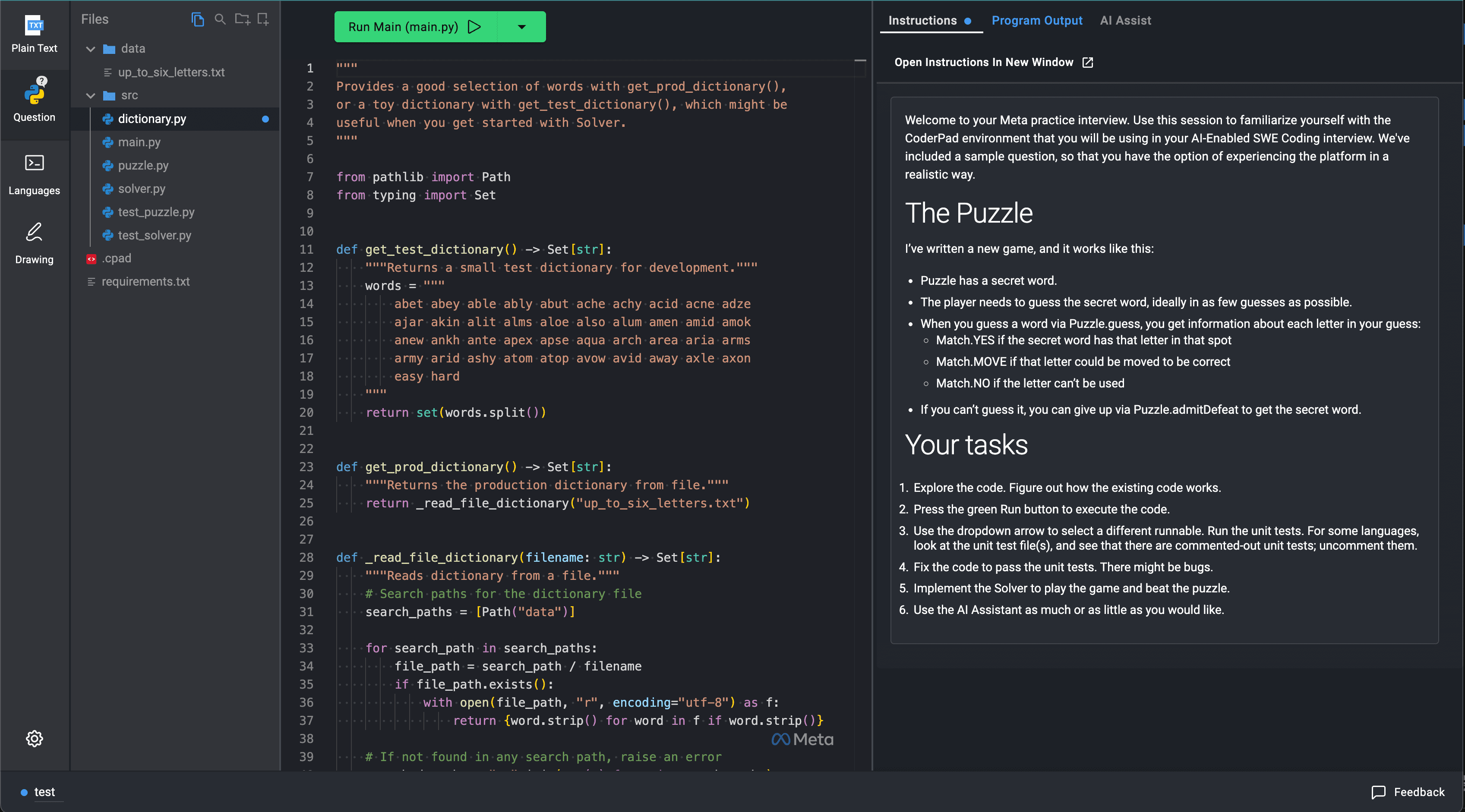
Meta CoderPad Practice Environment
The practice environment helps you get comfortable with the AI chat panel and model switching, running tests and reading their output, navigating the folder structure, and working around quirks like the output panel not auto-clearing. Every candidate I've spoken to said this was worth doing.
Algorithmic prep
Focus on backtracking, BFS/DFS, greedy algorithms, tries, DP fundamentals, and bitmask optimization. These are the algorithm families that keep showing up in candidate reports. You don't need to memorize implementations, that's what the AI is for, but you need to be able to recognize which algorithm fits the problem within seconds.
Still practice LeetCode hards on your own, without AI. You need to be able to solve hard problems independently since the AI may not reliably help with the core algorithmic logic.
Practice reading unfamiliar code
This might be the single most important skill for Meta's format. The entire interview revolves around a codebase you didn't write. If you're not used to quickly parsing class hierarchies, data models, and control flow in unfamiliar code, this will slow you down significantly.
Read open-source code. Use tools like DeepWiki to explore unfamiliar repos. Our guide on codebase orientation covers exactly what to look for and in what order.
Develop a workflow for weak AI
Practice with the AI chat turned off or with a less capable model. If the AI in your interview is nerfed, you need to be able to carry the algorithmic thinking yourself and use AI only for implementation. The candidates who panicked when the AI gave bad answers were the ones who had never practiced without it. We cover this in our how to prepare guide.
Time management
The 60 minutes disappears faster than you think. After the interviewer spends five to six minutes orienting you, and after phase 1 (bug finding, complexity analysis, explaining the code), you're left with roughly 30 to 40 minutes for the actual implementation and optimization phases. Several candidates specifically called out time as their biggest challenge.
The candidate who finished all three phases in 40 minutes had a clear advantage. He already knew exactly which algorithm to apply before he started coding. He didn't spend time exploring approaches or asking the AI for suggestions. He stated his plan, used AI to implement the known-correct data structure, and moved through the phases methodically.
Algorithmic knowledge directly translates to speed. If you can recognize "this needs a trie" or "this is a BFS with visited tracking" without thinking, you'll move through phases faster and have time to reach the optimization step. Candidates who needed to figure out the approach during the interview consistently ran short on time.
After orientation, bug fixing, and initial exploration, your effective working time for the main implementation and optimization is roughly 30 minutes. Don't spend 15 minutes perfecting phase 1 when phases 2 and 3 carry more weight.
Using the AI effectively
The AI is useful for writing boilerplate, implementing well-known data structures (tries, heaps, graphs), computing time complexity, generating helper functions, and benchmarking different approaches. Where it falls short is finding the core optimization insight, solving problems end-to-end, or reliably identifying bugs.
Write information-rich prompts. Give the AI full context so you get a good answer on the first try instead of going back and forth. Don't say "fix this." Say "implement a trie class that supports insert and prefix search, where each node stores a character and a boolean for end-of-word." We cover prompt granularity and when to use AI vs. writing code yourself in our fundamentals guide.
Tell the AI your intended approach and ask it to compute the time complexity before you start implementing. This validates your plan quickly and shows the interviewer you understand the tradeoffs.
Never copy-paste AI output without understanding it. Always verbally explain what the code does and why you're using it. If you don't understand an AI response, say so. It's genuinely better to write it yourself than get caught unable to explain pasted code.
Don't skip verification either. Quickly pasting AI responses without checking is a red flag. And don't ask the AI to "solve this problem for me." Guide it with specific, targeted questions instead. Interviewers are specifically watching for candidates who try to prompt their way to the solution.
A guaranteed way to fail this interview would be to prompt your way to success, never writing any code yourself or reviewing the AI's output. As one recruiter explicitly warned, "you can be marked down if you use it as a crutch."
Practice narrating
The dual conversation, talking to the AI and talking to the interviewer, is genuinely hard under time pressure. Practice talking through your thought process while simultaneously working with an AI assistant. It feels awkward at first, but it becomes natural with repetition. Our guide on communication during AI interviews breaks down exactly how to manage this.
Debugging in the CoderPad environment
For debugging, you can print outputs as usual, but the environment also supports interactive debuggers.
- Python. Use ipdb for interactive debugging.
- General. Print statements work, but remember the output panel doesn't auto-clear. Manually clear it or double-check you're looking at the newest logs.
Don't spend excessive time debugging AI output. Multiple candidates reported that reviewing AI suggestions sometimes takes as long as just writing the code yourself.
Your mindset going in
Treat the AI as an assistant, not the driver. You should be leading the solution at all times. As one candidate who cleared Meta's onsite put it, "You should be controlling AI, no matter how you use it. You always need to be in control."
If you already know the solution approach, explain the full optimal strategy upfront even if you can't implement it all in time. Interviewers give credit for demonstrating understanding even when the clock runs out.
Over-communicate with your interviewer throughout. What you're thinking, what you're doing, why you're copying something from the AI. The interviewer is mostly observing, but they need to hear your thought process to evaluate you.
Pay close attention to the data and input files in the codebase. The optimization catch is often hidden in the characteristics of the test data, not in the algorithm itself. Understanding what the inputs look like can tell you which optimization strategy will actually work.
Help us keep this updated
This interview format is still evolving. If you've gone through Meta's AI-enabled coding interview, drop a comment below. What was the problem structure like? Which AI model worked best for you? What surprised you?
If you spot anything outdated or inaccurate here, call it out so I can fix it.
Good luck!
Mark as read

About The Author
Evan, Co-founder of Hello Interview and former Staff engineer at Meta, possesses a unique vantage point having been on both sides of the tech hiring process. With a track record of conducting hundreds of interviews and securing offers from top tech companies himself, he is now on a mission to help others do the same.
Your account is free and you can post anonymously if you choose.